 Zero Robotics
2026 High School Program
Info
Teams
Leaderboard
Submission Log
Zero Robotics 2026
High School Game Manual
Galactic Garden • zerorobotics@mit.edu • zerorobotics.mit.edu
1 Game Letter
To: Zero Robotics Competitors
Greetings, Space Engineers! As part of an extended research campaign on the International Space Station (ISS), NASA and the Zero Robotics team are calling on your advanced coding and robotics skills. The ISS crew relies on Astrobee—an autonomous, free-flying robotic platform—to support critical operations in microgravity. This year, your challenge is to program Astrobee to manage a sustainable vegetable-growth system aboard the station.
Your robot must navigate in microgravity, execute precise maneuvering, and coordinate a full agricultural workflow: planting seeds, watering them on schedule, harvesting mature crops, and clearing failed plants. Astrobee must also allocate time efficiently, prioritize tasks dynamically, and respond to real-time mission updates from the crew.
Astronauts will specify which crop type they need using hand gestures. Your robot may visit the Astronaut Zone to detect this gesture—however, only one robot may enter the zone at any given time. Successfully identifying and fulfilling these requests can earn valuable bonus points.
Key Mission Considerations
Compete directly against another team. Strategy, efficiency, and autonomous decision-making are essential.
Watering Zone and Astronaut Zone are exclusive-use—only one robot at a time.
Manage space, handle failed crops quickly, and adapt to changing priorities.
Earn bonus points for distance traveled and plots visited!
High-performing programs optimize every movement, minimize idle time, and pursue the highest-value tasks.
The team that earns the most points wins. This is your opportunity to prove your engineering skills and claim the title of Best Space Robotics Team!
2 Background
Welcome to the Zero Robotics Game Manual for the 2026 High School Tournament: Galactic Garden! This guide will equip you with the essential knowledge and rules to participate.
As a participant, you're joining a community that directly contributes to research conducted on the International Space Station (ISS). Your involvement not only enhances your programming and robotics skills but also supports real-world space science initiatives. To provide you with a solid foundation, this manual includes background information on the history and current advancements in key topics relevant to the Galactic Garden challenge.
We encourage you to delve into this manual thoroughly to maximize your understanding and performance in the competition. Your journey in Zero Robotics is not just about coding; it's about pushing the boundaries of what's possible in space exploration.
Human Space Exploration
With the development of space technology in the 20th century, we had the opportunity to send machines, animals, and humans to outer space and explore the universe. The first human in space was Yuri Gagarin from the Soviet Union in 1961. Since then, over 600 people from 43 nations have traveled to space. As of December 2025, 10 people are currently living and working in space. Human space exploration helps us understand the universe's history and provides a platform for us to grow, experiment, and improve our lives.
The International Space Station (ISS) is the largest human-made object that orbits Earth. Since 2000, it has evolved from an outpost into a competent microgravity laboratory that hosts scientific investigations and demonstrations in various fields. The ISS has orbited Earth for 25 years, and as of December 2025, over 290 astronauts have visited it.
Growing Plants in Space
Plants are essential for sustaining human life during space missions! On extended journeys, farming plants provide astronauts with fresh, nutritious food and a comforting connection to Earth. NASA has initiated several innovative projects aboard the International Space Station (ISS) to study and enhance plant growth in microgravity.
Middle and high school students have played a pivotal role in advancing space plant research through the Growing Beyond Earth program. Launched in 2015, this classroom-based citizen science project, developed by Fairchild Tropical Botanic Garden in partnership with NASA, involves conducting experiments that simulate conditions aboard the ISS. By cultivating various plant species and collecting data on their growth, students provide valuable insights that help NASA scientists select crops suitable for space cultivation. To date, over 10,000 students across the United States have participated, contributing to NASA's research on growing plants in space.
One of NASA's notable projects is the Vegetable Production System, affectionately known as "Veggie". Established in 2014, Veggie is a plant growth unit that enables astronauts to cultivate various crops, including lettuce and zinnias, directly on the ISS. This system not only supplies fresh produce, but also serves as a platform to study plant growth in space.
Building upon Veggie's success, the Advanced Plant Habitat (APH) was introduced in 2017. The APH is a fully automated growth chamber equipped with a series of sensors and LED lights to control environmental conditions. This setup enables scientists to conduct detailed experiments on plant behavior in space, advancing our understanding of how plants adapt to microgravity.
Researchers have identified that light plays a crucial role in plant development. Experiments have shown that many plants thrive under red and blue light, prompting the use of specialized LED lighting systems in space-based plant growth chambers to optimize photosynthesis. Gravity, or the lack thereof, significantly influences plant growth. In microgravity, plants experience changes in leaf development and cellular structure. For instance, experiments have shown that microgravity affects the distribution of calcium within plant cells, a vital element for growth. Fortunately, these calcium fluctuations did not hinder overall plant growth.
Through these collaborative efforts and ongoing research, NASA continues to explore and overcome the challenges of growing plants in space, paving the way for sustainable long-term human missions beyond Earth!
Robotics in Space
Robotics in space will not only help overcome challenges humans may face, such as the lack of an atmosphere, but also make the best use of human time by having robots assist with various tasks. Two main areas of interest for space robotics are microgravity and planetary robotics. Microgravity robotics is the manipulation and mobility in microgravity environments, such as the International Space Station. Planetary robotics is robotics manipulation and mobility on or near the surface of a planet, such as Mars and the Lunar surface.
The Astrobee platform provides an exciting environment for learning robotics, space exploration, and teamwork through hands-on testing in the IDE.
Astrobee Robot
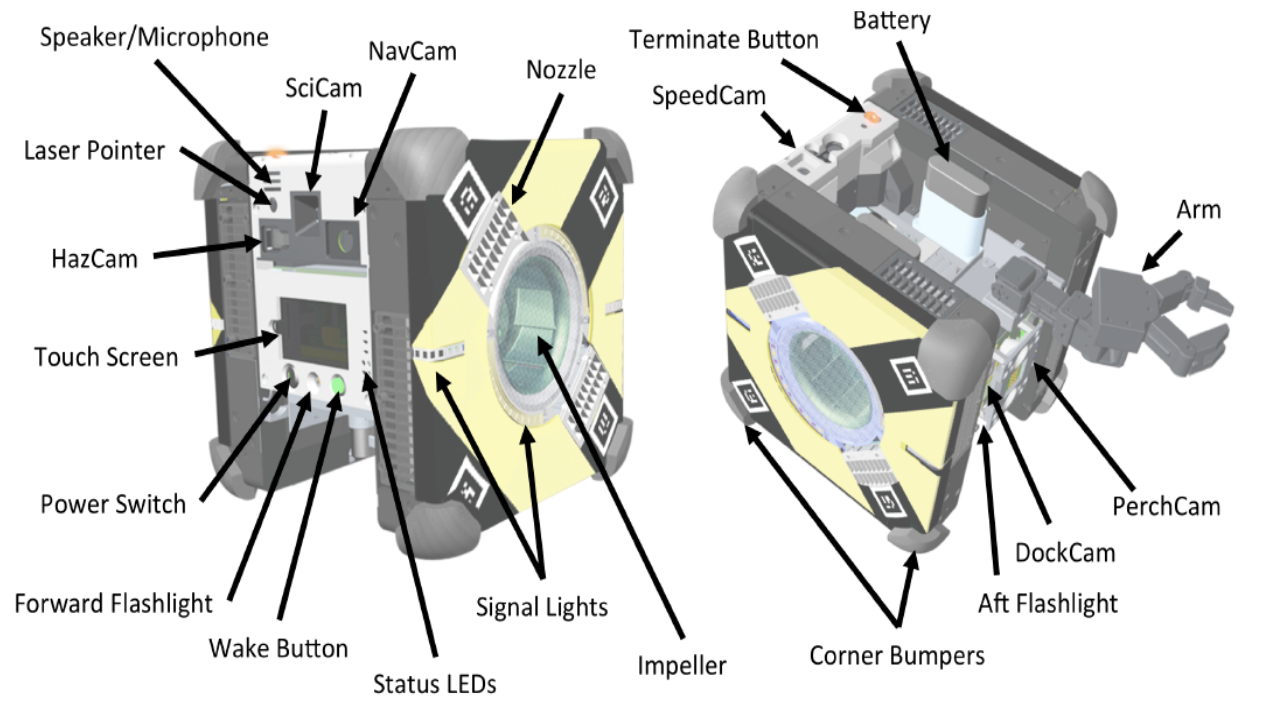
Astrobee is a new generation of free-flying robots designed to assist astronauts aboard the International Space Station (ISS). It replaces the SPHERES robots, which served as robotic test platforms on the ISS for over a decade, with significant hardware and software upgrades. The three Astrobee robots—Bumble, Queen, and Honey—were developed by NASA to reduce the time astronauts spend on routine tasks, allowing them to focus on activities that require human expertise.
Astrobee robots can operate autonomously or be remotely controlled by astronauts, flight controllers, or researchers on the ground. They can perform tasks such as taking inventory, documenting experiments with built-in cameras, and collaboratively moving cargo. Additionally, the system serves as a research platform, enabling scientists to conduct experiments and develop new technologies for future space missions. Robots like Astrobee are expected to play a critical role in future deep-space missions, acting as caretakers for spacecraft when humans are away.
Learn more about Astrobee here!
Legacy and Future Applications
Astrobee builds on the legacy of the SPHERES robots, incorporating lessons learned to create a more advanced system. It is modular and can be customized to carry experimental payloads, enabling diverse scientific research. Since the system can be upgraded over time, it provides a versatile platform for advancing space robotics.
As NASA prepares for future missions to the Moon and beyond, robots like Astrobee will play a vital role. They have the potential to act as autonomous caretakers, monitoring spacecraft systems and ensuring smooth operations during crew absences.
Ground Robotics Demo
This year, the Zero Robotics Competition Finals will be run and tested through simulation and a ground-robotics demonstration. On February 21st, instead of a purely virtual championship, we'll be running a ground robotics analog, and you'll have the chance to deploy your code onto real hardware, including drones and underwater robots.
That's right: your algorithms won't be stuck inside a simulator. They'll be navigating physical space, reacting to real-world conditions, and carrying out your strategies live. Few student robotics competitions offer something this hands-on, and it's your moment to shine.
We're also excited to continue a tradition from previous years. In the past, we've partnered with the Critical Matters group at the MIT Media Lab to run the Finals using new robotics platforms.
3 Game Introduction
Guide Astrobee to manage crops across 6 plots, respond to astronaut requests, and compete against another robot.
Game Duration: 240 seconds (4 minutes)
- Field: 6 garden plots, Watering Zone, Astronaut Zone, Home Zone
- Movement Bonus: 0.5 pts/meter + 2 pts per unique plot visited
- Astronaut: +5 pts per bonus crop assignment (max 3 times) + 50% harvest bonus
- Diversity: Same crop = diminishing returns. Diversify for max points!
4 Gameplay Concepts
Garden Layout
Click to see an overview of the game setup in 3D space
Movement
Coordinate system: X = Left/Right, Y = Forward/Back, Z = Up/Down
game.MoveTo(x, y, z);
game.MovePlot(id);           // id = 1-6
game.MoveAstronaut();
game.LeaveAstronaut();
game.MoveWatering();
game.MoveToHome();
Scoring System
Your total score combines multiple components—active robots score better!
Key Insight: The game rewards active, moving robots! Don't sit idle—keep buzzing around the plots!
Diminishing Returns System
Strategic crop diversity is rewarded! Each time you harvest the same crop type, subsequent harvests of that crop yield fewer points:
Formula: points = basePoints × (0.75)^harvestCount
Strategy Tip: Diversify your crops! Harvesting 6 different crops once each yields more points than harvesting the same crop 6 times.
Crop Types
Planting Crops
Each robot can plant crops at any of the six garden plots using:
game.PlantCrop(plotID, cropID);Where:
- plotID is 1, 2, 3, 4, 5, or 6
- cropID is 1-6 (see Crop Types table above)
The robot must move to the correct plot using game.MovePlot() and be physically at that location before calling game.PlantCrop().
Watering Crops
To water a crop, the robot must first move to the Watering Zone. Note that only one robot may use the Watering Zone at a time—if the other robot is already there, your robot will not complete the move.
game.MoveWatering();
game.FillWateringCan();  // fills 6 units of water
To water a planted crop, use:
game.WaterCrop(plotID);- Each crop must be watered twice in total to grow successfully
- Robots can carry a maximum of 6 units of water at a time
- The first watering can happen immediately after planting—there is no required delay
- Both waterings must be completed within 60 seconds of planting. If not, the crop will fail and must be removed using a shovel
- The robot must be physically at the correct garden plot to water the crop
Crop Growth and Harvesting
Crops follow a strict care timeline. Use this sequence to maximize harvest success:
- Watering can be done immediately after planting
- Both waterings must happen within 60 seconds of planting or the crop will fail
- Water #2 and Harvesting can only happen after the growth times have passed
Crop Cycle Timing Examples
Min Cycle Time = Plant + Water#1 + GrowthTime + Water#2 + GrowthTime + Harvest (plus movement)
After the growth time has passed, harvest using:
game.HarvestCrop(plotID);If a crop is harvested too early, no points are earned and the crop disappears. To prevent this, make sure enough time has passed since the last watering.
Note: The game environment does not provide built-in timers for watering deadlines or growth duration. Students are encouraged to implement their own timers using the game clock or timestamps when actions are performed!
Crop Failures and Shovel Use
If a plant is not watered twice within 60 seconds of planting, it fails and must be removed. Steps to remove a failed crop:
game.MoveToHome();        // Go to your home position
game.GrabShovel();        // Pick up the shovel
game.MovePlot(plotID);   // Go to the failed crop
game.RemoveCrop(plotID); // Remove the dead plant
game.MoveToHome();
game.DropShovel();        // Return the shovel
You must be holding the shovel to remove a crop.
Efficiency Tip: There is no explicit penalty for holding the shovel the entire match, but the shovel is very heavy and will drain your battery.
Movement and Exploration Stats
Track your robot's activity with these functions:
Battery and Movement Efficiency
Every movement uses battery power. Battery is not explicitly limited in gameplay; the remaining battery percentage affects your final score. Avoid unnecessary movements to conserve energy, and refrain from carrying heavy objects, such as the shovel!
End of Match
Each match lasts 240 seconds (4 minutes). When time expires, robots must stop all actions. The final score is computed based on crops harvested, bonus crop points, movement/exploration bonuses, and remaining battery.
The match ends automatically at 240 seconds.
Astronaut Bonus Sequence System
The astronaut is your best friend! Visit frequently to:
- Get +5 points per bonus crop assignment (max 3 times total)
- Receive a bonus crop assignment (+50% on harvests of that crop)
How It Works
- The astronaut offers a sequence of 3 different bonus crops
- Each bonus crop allows 1 harvest at +50% bonus, then advances to the next
- This promotes crop diversity—you harvest 3 different bonus crops!
- Visit astronaut again after harvesting to confirm each new bonus and get another +5 points!
- Complete all 3 bonus crops to earn an additional +10 points!
Example Sequence
Visit 1: "Your bonus crop is Tomato!" (+5 points for assignment)
   -> Harvest Tomato x1 (+50% bonus)
   -> Bonus advances to next crop

Visit 2: "Your new bonus crop is Melon!" (+5 points for assignment)
   -> Harvest Melon x1 (+50% bonus)
   -> Bonus advances to final crop

Visit 3: "Your final bonus crop is Blueberry!" (+5 points for assignment)
   -> Harvest Blueberry x1 (+50% bonus)
   -> ALL BONUS CROPS COMPLETED! +10 bonus points!
Strategy: Complete all 3 bonus crops to earn +10 completion bonus on top of the +15 points from visit assignments and the +50% harvest bonuses!
Astronaut API Functions
game.MoveAstronaut();              // Move to astronaut zone
int bonus = game.GetBonusCrop();  // Returns crop ID 1-6, awards +5 pts
game.LeaveAstronaut(); // Exit astronaut zone- Only one robot may occupy the Astronaut Zone at a time
- If the opposing robot is in the zone, your
game.MoveAstronaut()command will not succeed - The bonus crop must be identified using
game.GetBonusCrop()to earn bonus points—harvesting the correct crop without visiting the astronaut will not grant bonus points - The +5 visit bonus is only awarded once per bonus crop assignment (max 3 times total)
5 Advanced Features
Important: Advanced features are optional investment systems. They cost points upfront but can increase efficiency for longer matches. Consider whether the point investment will pay off before the game ends!
Sprinkler System
Sprinklers provide automated watering at a plot, freeing your robot to do other tasks. Once deployed at a plot, the sprinkler will automatically water any crop planted there at a set interval. Each sprinkler is stationary—it stays at the plot where you deploy it.
Cost: 10 points each
Limit: Maximum 2 sprinklers per robot
Durability: Sprinklers degrade over time (health 0-100%). At 0% health, they stop working.
Repair: Must be at Home Zone. Takes 5 seconds.
Sprinkler Example
// Buy and deploy a sprinkler at plot 1
game.BuySprinkler();           // -10 pts
game.MovePlot(1);
game.DeploySprinkler(1, 1);    // Deploy sprinkler #1 at plot 1
game.SetSprinklerInterval(1, 10);  // Water every 10 seconds
game.EnableSprinkler(1);

// Now plant a crop - the sprinkler will water it automatically!
game.PlantCrop(1, 5);  // Blueberry at plot 1
// Robot can now leave - sprinkler handles watering!
Space Tractor System
The Space Tractor is a modular upgrade system that enhances your robot's farming capabilities. You must first unlock the base tractor, then you can purchase attachments that provide special abilities. Attachments are add-ons to your robot—they travel with you, not stationed at plots.
Trade-off: The tractor increases battery drain by 2x while active. More power = faster work, but at a cost!
Tractor API Functions
Tractor Example
// Unlock tractor and fertilizer attachment
game.UnlockTractor();       // -25 pts
game.UnlockFertilizer();    // -20 pts, gives 5 uses

// Plant a melon and speed up growth with fertilizer
game.MovePlot(1);
game.PlantCrop(1, 6);       // Melon (normally 12s growth)
game.WaterCrop(1);
game.ApplyFertilizer(1);    // Now only 6s growth time!
Investment Strategy: Advanced features have significant upfront costs. A full tractor setup (base + all attachments) costs 75 points. Consider whether you can earn back more than that with the time saved!
6 API Reference
All functions require game. prefix!
Movement
Basic Operations
Sprinkler System
Space Tractor System
Getters
Movement & Exploration Stats
Note: The Control Settings Tab / PID Tuning tab is exposed in the graphical editor for MIT internal use, but teams are open to experimenting with it, and findings can be shared on Piazza! PID settings will not be changed/put into effect in the finals.
7 Strategy & Scoring
The goal of Galactic Garden is to earn the highest total score by planting, watering, and harvesting crops effectively while staying active. Each student programs one Astrobee robot and competes head-to-head against another student's code. The robot with the highest total score at the end of the match wins.
Final Score Formula
Total Score = Harvest Score + Bonus Completion + Astronaut Visits + Movement Bonus + Exploration Bonus + Battery Bonus
Scoring Summary
Costs Summary
Tips for Success
- Visit astronaut early & often — +5 pts per visit + bonus crops
- Keep moving — 0.5 pts/meter adds up
- Explore all 6 plots — 12 pts exploration bonus
- Diversify crops — Avoid diminishing returns
- Fast crops early — Blueberry (3s), Strawberry (5s)
- Complete all 3 bonus crops — +10 completion bonus
Sample Strategy Code
void loop() {
    // PRIORITY 1: Visit astronaut early for bonus crop and +5 points!
    game.MoveAstronaut();
    int bonus = game.GetBonusCrop();  // +5 points just for visiting!
    game.LeaveAstronaut();

    // PRIORITY 2: Explore all plots for exploration bonus
    // Plant diverse crops for diminishing returns strategy
    game.MovePlot(1);
    game.PlantCrop(1, bonus);  // Plant the bonus crop!
    game.WaterCrop(1);

    game.MovePlot(2);
    game.PlantCrop(2, 5);  // Blueberry (fast!)
    game.WaterCrop(2);

    // Explore more plots!
    game.MovePlot(3);
    game.PlantCrop(3, 3);  // Strawberry
    game.WaterCrop(3);

    // Refill water
    game.MoveWatering();
    game.FillWateringCan();

    // Continue farming cycle - keep moving!
    game.SetWait(3);  // Wait for blueberry to grow
    game.MovePlot(2);
    game.WaterCrop(2);  // Second watering

    game.SetWait(3);  // Wait for harvest
    game.HarvestCrop(2);

    // Visit astronaut again after harvesting bonus crop!
    // Get the next bonus crop in sequence and another +5 points
    game.MoveAstronaut();
    bonus = game.GetBonusCrop();
    game.LeaveAstronaut();

    // Check stats
    float dist = game.GetDistanceTraveled();  // Movement bonus!
    int plots = game.GetPlotsExplored();      // Exploration bonus!
}
Gameplay Summary
- Objective: Plant, water, and harvest crops while maximizing movement, exploration, and strategic astronaut visits.
- Competition: Only one robot (per match) is active and competes head-to-head against another student's robot code.
- Astronaut Zone: Visit (only one robot at a time) to receive +5 points and detect the bonus crop sequence.
- Watering Zone: Shared resource—only one robot may be in the Watering Zone at a time.
- Battery Score: Remaining battery at the end of the match is multiplied by 0.05 and added to your total score.
Plant → Water #1 → Wait Growth Time → Water #2 → Wait Growth Time → Harvest
8 Code Submission
- Test locally with the simulation tool
- Ensure code compiles and functions correctly
- Submit through the Zero Robotics portal
9 Resources & Guidelines
Key Dates
Piazza
URL: piazza.com/mit/spring2026/zrhs2026
Access Code: ZRHS26
AI Usage
ChatGPT and AI tools are allowed. Please document how you used them in your code write-up.
10 Tournament Rules
- MIT/ZR can use/publish submitted code
- Report bugs immediately
- No manipulating scoring or accessing restricted info
- Code must be written by students only
- No exploiting bugs or unintended features
11 Quick Reference
Crops
Blueberry:  3s / 3pts   Strawberry: 5s / 5pts
Tomato:     6s / 6pts   Cabbage:    8s / 7pts
Potato:     9s / 8pts   Melon:     12s / 11pts
Scoring
Harvest:     Base × (0.75)^count
Bonus crop:  +50%
All 3 bonus: +10 pts
Astronaut:   +5 pts × 3 max
Movement:    +0.5 pts/meter
Exploration: +2 pts/plot (max 12)
Key Functions
game.MovePlot(id)     game.PlantCrop(plot, crop)
game.WaterCrop(plot)  game.HarvestCrop(plot)
game.MoveAstronaut()  game.GetBonusCrop()
game.MoveWatering()   game.FillWateringCan()
12 IDE Patches
This section documents bug fixes and patches applied to the game simulation environment. These fixes are applied server-side and do not require any changes to your code.
Patch 1.1 - January 14, 2026
Astronaut Visit Bonus Fix
Issue: Calling GetBonusCrop() repeatedly in a loop would award the +5 astronaut visit bonus each time, instead of only when a new bonus crop is assigned.
Fix: The +5 bonus is now only awarded once per bonus crop assignment. Players must harvest the current bonus crop before the next bonus crop (and its +5 bonus) becomes available. Maximum of 3 bonuses total.
Advanced Features Documentation
Update: Added comprehensive documentation for the Sprinkler System and Tractor System APIs in Section 5 (Advanced Features).
Patch 1.2 - February 5, 2026
Sprinkler Auto-Watering Now Functional
Issue: Sprinklers could be purchased, deployed, and enabled, but they were not actually watering crops automatically.
Fix: Sprinklers now auto-water their assigned plot at the configured interval. Sprinkler health degrades by 2% per watering. Sprinklers respect all watering rules (growth timing, no overwatering, skip failed crops).
Crop 60-Second Timeout Implemented
Issue: The manual stated crops fail if not watered twice within 60 seconds, but this rule was not enforced.
Fix: Crops that do not receive both waterings within 60 seconds of planting will now automatically fail and must be removed with a shovel.
Battery Drain System Activated
Issue: Battery level was not decreasing during movement, and tractor 2x battery drain was not applied.
Fix: Battery now drains based on distance traveled and carried weight (shovel, water). Tractor activation doubles battery drain rate as documented.
Tractor Getter Functions Added
Issue: IsTractorUnlocked() and HasAttachment() were documented but did not appear on the student side.
Fix: Both functions are now available. Use game.IsTractorUnlocked() and game.HasAttachment("planter"), game.HasAttachment("harvester"), or game.HasAttachment("fertilizer").
Purchases Now Use Total Score
Issue: Purchasing sprinklers and tractor upgrades only checked harvest score, ignoring movement/exploration/battery bonuses.
Fix: All purchases now check against total score (harvest + movement + exploration + battery bonuses). Players can use all earned points to buy upgrades.
Note: If you encounter any bugs or unexpected behavior, please report them immediately on Piazza. We will update this section as patches are applied.


